Baby Games for 1-3 Year Olds
- 4.6
- Rating
- 10.00M
- Installs
- Free
- Price
 Analysis by App-foxy
When I tried Baby Games for 1-3 Year Olds, I approached it less like a conventional game and more like a short, guided play session for a very young child. That distinction matters. A toddler is not looking for a complex objective, a leaderboard, or a long adventure. They need clear reactions, simple choices, friendly pacing, and enough variety to stay interested without turning screen time into a struggle. This educational game from Bebi Family: preschool learning games for kids is built around that early-learning space, and I found its strongest quality to be its accessibility.
The app is free to download and is rated for Everyone, which makes it easy for families to try without committing money first. It has reached over five million installs and holds a 4.6 average from around 117 thousand ratings, so it is clearly familiar to many parents. Those figures are useful context, but they do not replace watching your own child use it. A game that feels comfortably simple to one toddler may feel repetitive to another, while a child who is still developing touch control may need an adult nearby.
How the first play sessions feel
The best way to introduce this game is not to hand over the phone and walk away. I would sit beside a child for the first few sessions, demonstrate one interaction, and then let the child repeat it. At this age, the learning value often comes from the conversation around the screen: naming what appears, asking the child to find something, and celebrating an attempt rather than demanding a perfect answer.
You May Also Like

 Blood Strike: 2.5 Anniversary
Blood Strike’s Loadouts Turn Every Drop Into a Tactical Gamble
A close look at Blood Strike’s custom loadouts: how fast access to signature weapons reshapes its battle royale rhythm, rewards preparation, and narrows the gap between fights.

 Pandora - Music & Podcasts
Pandora’s Music Is Easy to Start, but Harder to Recover
Pandora’s strength is its low-effort path from a seed to a station. Its weak spot is how much confidence it asks you to place in connection, setup, and quiet recovery.

 8 Ball Pool
 Is Built on Rivalries, Rematches, and Routine
A close look at the rivalries, rematches, shared routines, and unanswered safety questions that turn a quick pool match into a persistent mobile community.

 Samsung Music
’s Quiet Strength Is Playing What You Already Own
Its reach comes less from spectacle than from dependable access to a personal library. That simplicity is both the app’s strongest retention engine and its ceiling.

 AccuWeather: Weather Radar
AccuWeather Review: A Quick, Clear Forecast for Everyday Decisions
For everyday plans, the best forecast is the one you can understand quickly. AccuWeather makes rain timing, radar, and local conditions easy to act on, with a few trade-offs.

 Hill Climb Racing
Why Hill Climb Racing Still Turns Crashes Into One More Run
A tiny car, a bumpy hill and one more upgrade: Hill Climb Racing keeps resurfacing because its simple chaos makes every near-miss feel personal.
More From Our News Desk



That approach also reveals an important strength. The app can turn a brief waiting period into a small learning routine without requiring a child to understand menus or written instructions. For a toddler who is beginning to recognize colors, shapes, objects, or simple relationships, the direct interaction is more approachable than a traditional lesson. The screen gives an immediate response, while the adult supplies the language and context.
I would use it during a short morning activity, while waiting for an appointment, or during a calm transition before dinner. I would not plan an entire afternoon around it. Very young children benefit from movement, conversation, books, and hands-on play, and this game works best as one small part of that mix. Its design makes it suitable for quick sessions rather than a substitute for broader preschool experiences.
The most useful habit is to treat each round as a prompt for real-world learning. If the child encounters an object, I might point to the same kind of object in the room. If the activity involves matching or recognition, I can continue with toys, clothes, or items on the kitchen table. That simple extension gives the app more value than passive tapping alone.
What makes it approachable for toddlers
Young children often struggle with interfaces designed for older players. Small buttons, complicated instructions, and several layers of menus can turn a learning activity into an exercise in frustration. Baby Games for 1-3 Year Olds aims at a much earlier stage, so the experience feels more immediate. A child can explore through touch without needing to read, type, or understand a scoring system.
That simplicity is also a useful test of parental expectations. This is not the right choice if you want a structured curriculum with detailed explanations for adults, formal lesson plans, or measurable academic progression. It is better understood as a collection of early-learning play moments. I found that distinction helpful because it prevents the app from being judged by standards meant for older children.
The developer, Bebi Family: preschool learning games for kids, focuses specifically on preschool-oriented titles. That specialization is reassuring for parents who want content aimed at early childhood rather than an all-ages game that happens to include a child-friendly mode. Still, a developer label alone cannot tell me how every activity will suit an individual child, so I would use the first session to check whether the pace and presentation fit my family.
Progress without turning play into pressure
For a one-year-old, success may simply mean touching the right area of the screen. For a three-year-old, the same activity may become an opportunity to identify, compare, and explain. That range is one reason the game can remain useful across the stated age group, but it also means parents should adjust their expectations. A toddler does not need to “complete” everything for the session to be worthwhile.
I prefer to let the child stop while the activity is still enjoyable. If a child begins tapping randomly, becomes restless, or asks to leave, continuing usually reduces the learning value. Short sessions also make it easier to notice what the child is actually practicing. One day the focus may be hand control; another day it may be vocabulary or recognition. The adult can choose the conversation, even when the app supplies the activity.
There is a subtle trade-off here. Repetition is valuable for toddlers because it helps them remember patterns, but repeated exposure can feel dull to an older preschooler. If a child already handles the activities confidently, I would move from simply answering to asking follow-up questions: “How do you know?” “Can you find another one?” or “What color is that?” If the game itself does not provide enough challenge, the adult can add it verbally.
I also would not use visible progress, if present in a particular activity, as a reason to push a child through discomfort. Early learning should not feel like a test. The app is most constructive when it supports curiosity rather than creating a demand for constant achievement. Parents who want explicit milestones, detailed reports, or a formal reward path may find a dedicated preschool learning platform more suitable.
Fairness, purchases, and the role of the adult
The game is free, but it includes in-app purchases ranging from $4.99 to $49.99 per item. That is the spending detail I would pay closest attention to before letting a child explore independently. A toddler cannot evaluate a purchase, understand its cost, or distinguish a normal tap from a buying decision. Any purchase control should therefore remain with the adult, and I would avoid treating a child’s interest in locked or additional content as a reason to spend immediately.
The store summary presents the experience as ad-free, which is a meaningful point for a children’s app. Fewer commercial interruptions can make a short activity calmer and reduce the chance that a child taps something unrelated. Even so, “ad-free” does not mean a child should manage the device alone. I would still set up the app myself, check what is available without payment, and keep the device’s purchase protections active.
From a fairness perspective, this is not a competitive game. There are no opponents to defeat, no public ranking to chase, and no reason for one child to lose because another family spends more. That removes a common source of pressure found in many mobile games. The important fairness question here is different: whether the free experience is enough for your child, and whether additional purchases are genuinely useful rather than simply tempting.
I would make that decision after observing repeated use, not after a single excited session. If the free activities already support the child’s needs, paying may add little practical value. If the child returns to the game calmly and the extra material fits a clear learning goal, a purchase could be easier to justify. The price range means families should consider the upper end carefully rather than assuming every optional item has the same cost.
There is also a social fairness angle. Because the game is aimed at toddlers, comparing one child’s access with another child’s access is not particularly helpful. A child does not need every available activity to benefit from practice. I would focus on whether the app encourages useful interaction in our home, not whether another family has unlocked more content.
Where it fits beside books and other learning apps
Compared with a picture book, this game offers more immediate response and invites the child to act rather than only listen. That can be helpful for a toddler who learns through touch and repetition. A book, however, gives an adult more room to pause, ask open questions, and follow the child’s imagination. I would use both, because the app’s quick feedback cannot replace the richer conversation that develops around a shared story.
Compared with open-ended creative apps, Baby Games for 1-3 Year Olds is likely to feel more guided. That is useful when a child needs a clear task, but less appealing when the goal is drawing, building, or inventing freely. Compared with older-child educational games, it is a better fit for basic interaction and early recognition, but it will not satisfy a child looking for complex puzzles, narrative progression, or a serious challenge.
The strongest comparison is not “which app is best?” but “what does my child need right now?” For a toddler learning how to control a touchscreen, a focused preschool game can be more appropriate than a broad educational suite. For a family seeking language practice in a particular curriculum, printable activities or a specialist learning tool may be better. For a child who becomes overstimulated by screens, a physical matching game is the wiser choice.
One practical workflow worked well for me: I would choose a quiet moment, play alongside the child for a few minutes, then continue the same concept away from the device. That prevents the app from becoming the entire activity. It also helps answer a question many parents have: does the child understand the idea, or are they only learning where to tap? The offline follow-up makes that difference visible.
Small details parents should consider before relying on it
The minimum operating system is Android 6.0, so families using an older Android device should check compatibility before planning around it. The current version is 7.01.39, which is useful when identifying the installed release or checking whether an update is available. I would also allow time for setup on the actual device the child will use, because an experience that works smoothly on one phone may feel less comfortable on another screen.
I would pay attention to the child’s physical interaction as well. Some toddlers press with a whole hand, drag unintentionally, or tap repeatedly before a response appears. That is normal development, not misbehavior. A larger device can be easier for shared play, while a smaller phone may be convenient during travel but harder for a child to control accurately. Holding the device steady and keeping the session short can make a noticeable difference.
Another non-obvious tip is to use the app as an observation tool rather than only an entertainment tool. Watch whether the child waits for feedback, imitates your language, remembers a choice, or begins to anticipate what comes next. Those observations can guide what you practice offline. If the child recognizes an item on screen but cannot name it in conversation, the next step is vocabulary. If the child knows the answer but struggles to touch it, the next step may be motor practice rather than more screen time.
I would also avoid correcting every mistake instantly. Give the child a moment to explore, then offer a simple clue. This keeps the activity from becoming a rapid-fire test and lets you see whether the child can recover independently. The app can provide the structure, but the adult decides whether the experience feels encouraging or demanding.
What remains a personal decision
Some families will want more transparency before allowing a young child to use any free app with optional purchases. That is reasonable. I would review the available content myself, confirm how purchasing is handled on the device, and decide whether the ad-free presentation is enough to make this a comfortable choice. I would not assume that a high rating answers those household questions, because ratings describe broad user satisfaction rather than your child’s temperament or your spending boundaries.
The same applies to developmental fit. A three-year-old who enjoys matching and recognition may find the experience pleasantly easy, while another may outgrow it quickly. A younger toddler may need more physical help than the age range suggests. The stated age group is a useful starting point, not a guarantee that every activity will be equally suitable at every stage.
Privacy, permissions, and account behavior are areas where I would make my own setup check before regular use. I would read the device prompts, look over the app’s settings, and keep the child in a restricted profile where possible. That is not a criticism of this particular game; it is a sensible routine for any app used by a child too young to manage digital choices.
My trust verdict for families
After using Baby Games for 1-3 Year Olds as a short, supervised learning activity, I see it as a sensible option for parents who want simple preschool play without a competitive layer. Its free entry, Everyone rating, ad-free store positioning, and focus from Bebi Family: preschool learning games for kids make it easy to consider. The large number of installs and strong average rating suggest broad appeal, but I would still judge it by the child in front of me.
My recommendation comes with clear boundaries. Keep purchases under adult control, introduce the game in brief sessions, and connect what happens on screen with books, toys, movement, and conversation. Do not expect a complete preschool curriculum or a detailed progress system from a toddler game. If your child needs advanced challenges, formal learning reports, or open-ended creativity, another type of app—or no app at all—may be a better match.
For the right family, the value is not that it keeps a child busy for a long time. The value is that it can create a manageable starting point for touch-based learning and give an adult ideas for extending play beyond the screen. I would recommend trying the free version first and watching how your child responds before considering any optional spending. Used that way, it feels less like a digital babysitter and more like a small, practical tool in a wider early-learning routine.
FAQs for Baby Games for 1-3 Year Olds
01What age group is Baby Games for 1-3 Year Olds designed for?
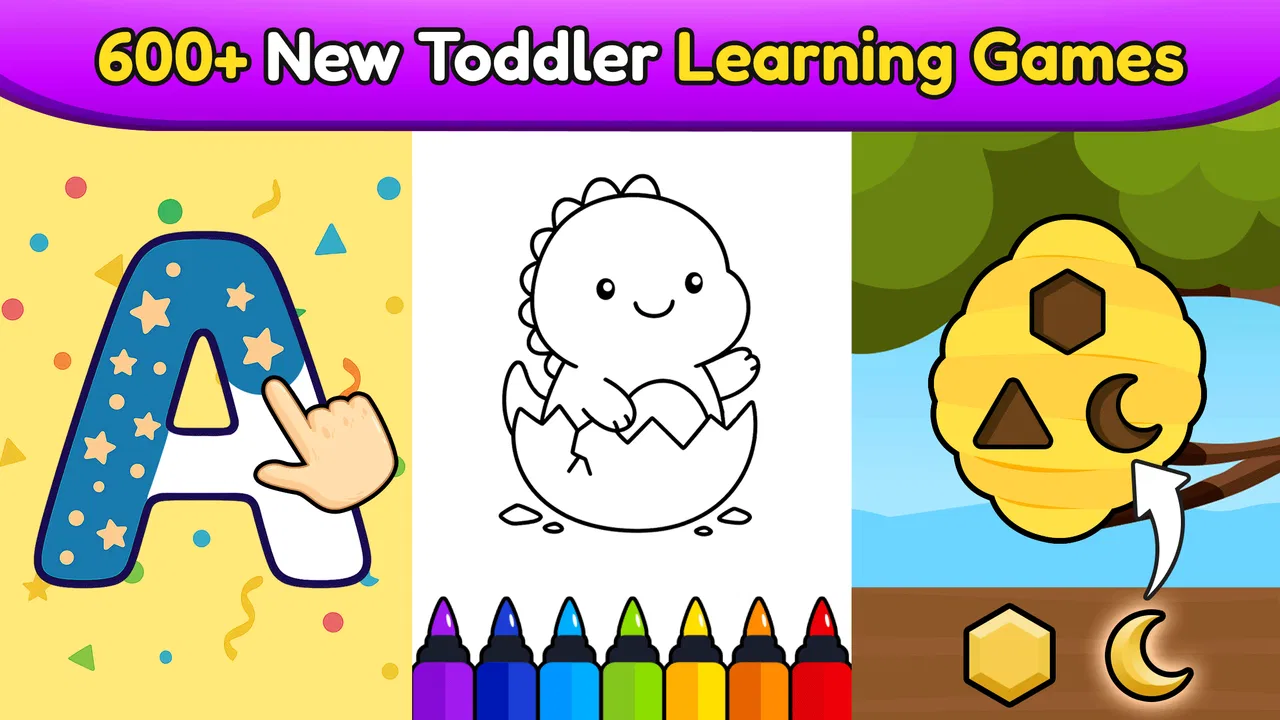
Baby Games for 1-3 Year Olds is specifically designed for toddlers aged between one and three years old. The app offers age-appropriate games and activities that focus on developing basic skills such as hand-eye coordination, cognitive abilities, and early learning concepts in a fun and engaging way.
02Is the app safe for my child to use?
Yes, the app is designed with safety in mind. It includes child-friendly content with no inappropriate ads or in-app purchases that require parental approval. The interface is simple and intuitive, allowing children to navigate without unnecessary distractions or risks.
03What types of games and activities are included in the app?
The app includes a variety of games and activities that promote learning through play. These may include puzzles, matching games, and simple interactive tasks that encourage creativity, problem-solving, and early literacy and numeracy skills. Each activity is tailored to suit the developmental stage of toddlers.
04Does the app require an internet connection to function?
No, Baby Games for 1-3 Year Olds can be used offline, making it convenient for travel and places without internet access. However, an internet connection might be required for initial download, updates, and certain features if applicable, such as downloading additional content.
05Are there any parental controls available in the app?
Yes, the app includes parental controls to ensure a safe and secure environment for your child. Parents can manage settings, monitor usage, and restrict access to certain features. These controls help maintain a focus on learning and prevent accidental in-app purchases or changes to settings.
Pros
- Engaging and colorful graphics.
- Simple
- intuitive interface.
- Promotes learning through play.
- Variety of mini-games included.
- Safe
- ad-free environment.
Cons
- Limited content in free version.
- Requires parental supervision.
- No offline mode available.
- Can be repetitive for older kids.
- In-app purchases can add up.

Baby Games for 1-3 Year Olds
Gallery